Splashtop Remote desktop
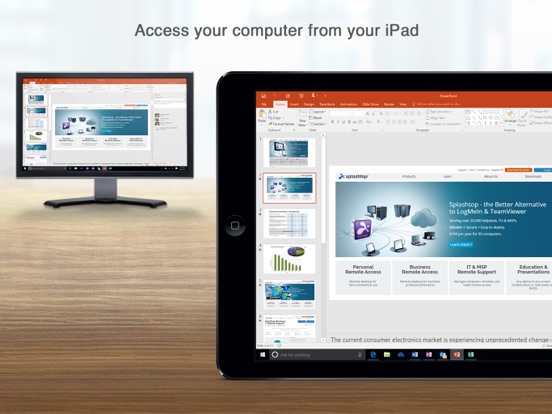
Nejlepší aplikace pro vzdálenou plochu z PC nebo Macku na iPad, iPhone v místní wifi síti.
Placená 1,59 euro nebo free s omezením funkčnosti k vyzkoušení na 5 minut. Pro iPad i pro iPhone se kupuje zvlášť.
Je potřeba stáhnout a nainstalovat klienta do compu http://www.splashtop.com/remote/download
Po nainstalování do compu a stažení aplikace do iPadu nebo iPhone a jejím spuštění se zadá heslo (písmena, číslice) a je připraveno. Aplikace sama najde comp, další comp lze přidat ručně v aplikaci.
Vše funguje na jedničku, takřka okamžitá odezva a přesnost myši a to i při spuštěném jiném systému na compu ve virtualu, viz. video. Možnost sledování Eye TV, filmů z compu na iPadu nebo iPhone, vytváření, prohlížení dokumentů úplně stejně jako deskopu. Minimální zatížení, žádné trhání atd.
link na iTunes
screen z iPadu - návod gest na iPadu:

Zobrazit video na http://youtu.be/IDtV1OLHFik
Kód do fóra: [youtube]IDtV1OLHFik[/youtube]
Návod na vkladanie videa do príspevkov

Business
09.09.2026 04:32
Velikost: 17 MB
Cena: US$ 0
Hodnoceni: 4.68122
od 4078 lidí
od 4078 lidí

Splashtop Inc.
Splashtop - Remote Desktop 3.8.6.2
NEED ACCESS RIGHT NOW?
FORGOT SOMETHING ON YOUR COMPUTER?
Your computer, anywhere you are.
Access your Mac or PC securely from your phone or tablet – anytime, anywhere.
Whether you’re traveling, helping family, or need something urgently from your Mac or PC, Splashtop gives you fast, reliable remote access in seconds.
No complicated setup.
No lag.
Just control.
GET STARTED IN 3 STEPS
1. Install Splashtop on your phone or tablet
2. Install the free Splashtop Streamer on your computer
3. Log in and connect instantly. That’s it.
WHAT PEOPLE USE SPLASHTOP FOR
• Accessing full apps, files, and tools they left at home
• Working remotely when plans change
• Helping parents or friends fix computer issues
• Staying productive while traveling
• Getting peace of mind knowing their computer is always reachable
WHY SPLASHTOP
Splashtop is trusted by millions of users and IT teams worldwide for one reason:
it works when it matters.
• ULTRA-FAST
Smooth, high-resolution streaming with low latency.
• SIMPLE SETUP
Install, log in, and connect. No IT degree required.
• SECURE
Bank-grade encryption keeps your data and your screen private.
• RELIABLE
Works even on limited bandwidth or mobile data.
This is the same remote access technology used by professionals – made simple for personal use.
FREE VS ANYWHERE ACCESS
• FREE
Access your computer on the same local network
• ANYWHERE ACCESS (UPGRADE)
Securely connect from anywhere, on any network
When remote access becomes important – not just occasional – upgrading unlocks full freedom without changing tools.
KEY FEATURES
• Access your Mac or Windows computer anytime
• High-quality audio & video streaming
• Low-latency remote control
• Blank screen mode for privacy
• Remote webcam access
• Cross-platform support (Windows, Mac, iOS)
PERSONAL VS BUSINESS
Splashtop Personal is designed for non-commercial use.
For work or teams, try Splashtop Business for advanced features and management.
A REMOTE ACCESS TOOL YOU CAN TRUST
When your computer matters, access shouldn’t be complicated.
Splashtop gives you control, clarity, and confidence – wherever you are.
See our Terms of Service and Privacy policy at https://www.splashtop.com/terms/splashtop.
FORGOT SOMETHING ON YOUR COMPUTER?
Your computer, anywhere you are.
Access your Mac or PC securely from your phone or tablet – anytime, anywhere.
Whether you’re traveling, helping family, or need something urgently from your Mac or PC, Splashtop gives you fast, reliable remote access in seconds.
No complicated setup.
No lag.
Just control.
GET STARTED IN 3 STEPS
1. Install Splashtop on your phone or tablet
2. Install the free Splashtop Streamer on your computer
3. Log in and connect instantly. That’s it.
WHAT PEOPLE USE SPLASHTOP FOR
• Accessing full apps, files, and tools they left at home
• Working remotely when plans change
• Helping parents or friends fix computer issues
• Staying productive while traveling
• Getting peace of mind knowing their computer is always reachable
WHY SPLASHTOP
Splashtop is trusted by millions of users and IT teams worldwide for one reason:
it works when it matters.
• ULTRA-FAST
Smooth, high-resolution streaming with low latency.
• SIMPLE SETUP
Install, log in, and connect. No IT degree required.
• SECURE
Bank-grade encryption keeps your data and your screen private.
• RELIABLE
Works even on limited bandwidth or mobile data.
This is the same remote access technology used by professionals – made simple for personal use.
FREE VS ANYWHERE ACCESS
• FREE
Access your computer on the same local network
• ANYWHERE ACCESS (UPGRADE)
Securely connect from anywhere, on any network
When remote access becomes important – not just occasional – upgrading unlocks full freedom without changing tools.
KEY FEATURES
• Access your Mac or Windows computer anytime
• High-quality audio & video streaming
• Low-latency remote control
• Blank screen mode for privacy
• Remote webcam access
• Cross-platform support (Windows, Mac, iOS)
PERSONAL VS BUSINESS
Splashtop Personal is designed for non-commercial use.
For work or teams, try Splashtop Business for advanced features and management.
A REMOTE ACCESS TOOL YOU CAN TRUST
When your computer matters, access shouldn’t be complicated.
Splashtop gives you control, clarity, and confidence – wherever you are.
See our Terms of Service and Privacy policy at https://www.splashtop.com/terms/splashtop.


 dik za tip

 iPhone 6 Plus





 iPad Air 128GB Cellular | iPhone 5S 16GB
 Dělá Vám to taky, nebo mám něco blbě nastaveno