EDIT:
Uz jsem to nemohl vydrzet a koupil jsem DocScanner. Takze dnes jsem stal hrdym vlastnikem 3 nejlepsich skenovacich aplikaci

Takze tady mate porovnani vsech 3:
Porovnani naskenovanych dokumentu
JotNot
ScannerPro
DocScanner
JPEG
JotNot
ScannerPro
DocScanner
MUJ zebricek podle nekolika kriterii
Citelnost a kvalita naskenovanych dokumentu
1. DocScanner - nejcistsi a nejcitelnejsi vysledky
2. JotNot - o neco horsi nez DocScanner, ale porad velice kvalitni
3. Scanner Pro - nic moc, neda se ani moc opravit, vzhledem k velmi omezenym moznostem nastaveni
UI a pohodlnost pri pouzivani
1. Scanner Pro - nejprijemnejsi a nejintuitivnejsi ovladani, nejlepe reseni pro skenovani vice dokumentu
2. DocScanner - neni tak pohledny a intuitivni jako Scanner Pro, ale rychle si zvyknete, obstojne reseni pro vice dokumentu
3. JotNot - na prvni pohled hezke, ale po blizsim prozkoumani naleznete hodne nedostatku, nestastne reseni pro vice dokumentu
Mnozstvi moznosti nastaveni (jas, kontrast apod.)
1. JotNot - nejvic tlacitek a slideru, ale kdyz je poradne prozkoumate dojde vam, ze vlastne tolik "kouzel" neudelaji
2. DocScanner - na prvni pohled mene tlacitek a slider-u nez v JotNot, ale ty realne potrebne jsou pritomne a vzhledem k velmi kvalitnimu automatizovanemu zpracovani to vubec nevadi
3. ScannerPro - velice omezene
Prace a rozpoznavani okraju
1. DocScanner - temer dokonale rozpoznani (vcetne automatickeho rozponani uz pri foceni)
2. JotNot - obcas problemy s rozpoznavanim, ale velmi dobre nastavitelne
3. ScannerPro - take obcas problemy s rozpoznavanim a katastrofalne nastavitelne
Scanner Pro: http://itunes.apple.com/cz/app/scanner- ... 10667?mt=8
Jotnot scanner: http://itunes.apple.com/cz/app/jotnot-s ... 68751?mt=8
DocScanner: http://itunes.apple.com/cz/app/docscann ... 91317?mt=8

Business
27.09.2026 14:29
Velikost: 277 MB
Cena: US$ 0
Hodnoceni: 4.87366
od 336409 lidí
od 336409 lidí

Readdle Technologies Limited
Scanner Pro - Scan to PDF 9.0.1
Scanner Pro is a professional document scanner that turns your iPhone or iPad into a portable scan-to-PDF tool. Scan agreements, receipts, IDs, books, and more — Scanner Pro automatically detects borders, corrects perspective, and removes shadows to produce clean, ready-to-share PDFs in seconds.
DOCUMENT SCANNER
- Scan documents, receipts, pictures, IDs, books, and photos with automatic edge detection and perspective correction
- Digitize and restore old photos in color, black & white, or grayscale
- Highlight, write, and draw directly on your scanned documents
CONVERT & EXPORT
- Convert any scan into a searchable PDF in seconds
- Export scans as PDF, Word, PowerPoint, or JPG
- Merge multiple pages into a single PDF document
- Add a password to protect sensitive PDFs, or remove one when no longer needed
SIGN DOCUMENTS
- Add your signature to any scanned document or PDF in seconds
- Fill out forms and place text, checkmarks, and initials anywhere on a document
- Send signed documents directly by email or to any app
OCR & FULL-TEXT SEARCH
- Turn scanned text into editable text with built-in OCR
- Search across the text inside your scans instantly
- Highlight important sections and copy text directly from your scans
QR CODE SCANNER
- Scan and decode QR codes instantly from the camera screen — point, capture, done
SHARE & SYNC
- Access every scan on all your devices with iCloud sync
- Automatically export and upload scans to Dropbox, Evernote, Google Drive, Box, iCloud Drive, OneDrive, OneNote, or any WebDAV-enabled storage
- Share unlimited scans by email or with any app, completely free
- Translate scanned text into other languages
You can also fax documents directly from your device.
Scanner Pro supports 25+ languages, including English, French, German, Italian, Spanish, Portuguese, Dutch, Russian, Ukrainian, Turkish, Japanese, and Simplified and Traditional Chinese.
Download Scanner Pro today for a fast, professional way to scan, organize, and share documents wherever you are.
Share your feedback and comments at http://readdle.com/contact
Privacy Policy: https://readdle.com/scannerpro/legal/privacy
Terms of Service: https://readdle.com/scannerpro/legal/terms
DOCUMENT SCANNER
- Scan documents, receipts, pictures, IDs, books, and photos with automatic edge detection and perspective correction
- Digitize and restore old photos in color, black & white, or grayscale
- Highlight, write, and draw directly on your scanned documents
CONVERT & EXPORT
- Convert any scan into a searchable PDF in seconds
- Export scans as PDF, Word, PowerPoint, or JPG
- Merge multiple pages into a single PDF document
- Add a password to protect sensitive PDFs, or remove one when no longer needed
SIGN DOCUMENTS
- Add your signature to any scanned document or PDF in seconds
- Fill out forms and place text, checkmarks, and initials anywhere on a document
- Send signed documents directly by email or to any app
OCR & FULL-TEXT SEARCH
- Turn scanned text into editable text with built-in OCR
- Search across the text inside your scans instantly
- Highlight important sections and copy text directly from your scans
QR CODE SCANNER
- Scan and decode QR codes instantly from the camera screen — point, capture, done
SHARE & SYNC
- Access every scan on all your devices with iCloud sync
- Automatically export and upload scans to Dropbox, Evernote, Google Drive, Box, iCloud Drive, OneDrive, OneNote, or any WebDAV-enabled storage
- Share unlimited scans by email or with any app, completely free
- Translate scanned text into other languages
You can also fax documents directly from your device.
Scanner Pro supports 25+ languages, including English, French, German, Italian, Spanish, Portuguese, Dutch, Russian, Ukrainian, Turkish, Japanese, and Simplified and Traditional Chinese.
Download Scanner Pro today for a fast, professional way to scan, organize, and share documents wherever you are.
Share your feedback and comments at http://readdle.com/contact
Privacy Policy: https://readdle.com/scannerpro/legal/privacy
Terms of Service: https://readdle.com/scannerpro/legal/terms


Business
18.12.2020 21:50
Velikost: 81 MB
Cena: US$ 6.99
Hodnoceni: 4.87981
od 30327 lidí
od 30327 lidí
MobiTech 3000 LLC
JotNot Scanner App Pro 5.1.4
JotNot is the quickest and easiest way to save a digital version of your paper documents. With JotNot's advanced image processing algorithms, your scans come out crisp, clear, and suitable for printing every time.
JotNot is the original document scanner app, trusted by millions of people in over 150 countries. It is recommended by The New York Times, TechCrunch, and MacWorld UK.
ELIMINATE PAPER WITH JOTNOT
With a PDF scanner in your pocket, there is no need to ever keep receipts in your wallet, tax records in your filing cabinet, or notes scattered across your desk. Scan and archive digital copies, and simplify your life.
SCAN ANYTHING
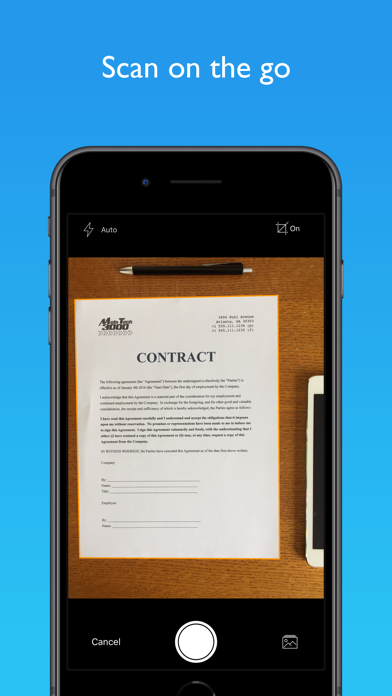
* Digitize contracts, receipts, expense forms, or business cards
* Extract text from your scans with OCR
* Save notes, recipes, or photos in cloud storage
* Scan and export sheet music to a music app like ForScore, or sketches to a drawing app
* Scan whiteboards or presentations to take notes in class or during meetings
EASILY SHARE YOUR SCANS
* Email your scans as PDFs
* Automatically upload your scans to the cloud
* Upload to Dropbox, Google Drive, Box, OneDrive, OneNote, Evernote, iCloud, and more
* Share documents with a computer via WiFi
ADVANCED AND EFFICIENT SCANNING
* JotNot automatically detects edges and processes images to remove shadows, correct contrast, and adjust white balance
* Scan in full color, black-and-white, and a variety of other modes
* Convert scans to PDF or JPEG
* Efficiently scan multi-page documents
ADDITIONAL FEATURES
* Password-protect sensitive files
* Lock the app with a password, Touch ID, or Face ID (if supported by your device)
* Tag documents and search by tag or name
* Sort by name or date
* Rename or delete files to stay organized
COST
JotNot Pro is a one-time purchase. There are no automatically recurring charges or subscriptions.
QUESTIONS OR PROBLEMS?
We aim to provide the best possible user experience and service. Please contact us at support@jotnot.com for personal help from the developers to resolve any issue.
JotNot is made in the USA.
JotNot is the original document scanner app, trusted by millions of people in over 150 countries. It is recommended by The New York Times, TechCrunch, and MacWorld UK.
ELIMINATE PAPER WITH JOTNOT
With a PDF scanner in your pocket, there is no need to ever keep receipts in your wallet, tax records in your filing cabinet, or notes scattered across your desk. Scan and archive digital copies, and simplify your life.
SCAN ANYTHING
* Digitize contracts, receipts, expense forms, or business cards
* Extract text from your scans with OCR
* Save notes, recipes, or photos in cloud storage
* Scan and export sheet music to a music app like ForScore, or sketches to a drawing app
* Scan whiteboards or presentations to take notes in class or during meetings
EASILY SHARE YOUR SCANS
* Email your scans as PDFs
* Automatically upload your scans to the cloud
* Upload to Dropbox, Google Drive, Box, OneDrive, OneNote, Evernote, iCloud, and more
* Share documents with a computer via WiFi
ADVANCED AND EFFICIENT SCANNING
* JotNot automatically detects edges and processes images to remove shadows, correct contrast, and adjust white balance
* Scan in full color, black-and-white, and a variety of other modes
* Convert scans to PDF or JPEG
* Efficiently scan multi-page documents
ADDITIONAL FEATURES
* Password-protect sensitive files
* Lock the app with a password, Touch ID, or Face ID (if supported by your device)
* Tag documents and search by tag or name
* Sort by name or date
* Rename or delete files to stay organized
COST
JotNot Pro is a one-time purchase. There are no automatically recurring charges or subscriptions.
QUESTIONS OR PROBLEMS?
We aim to provide the best possible user experience and service. Please contact us at support@jotnot.com for personal help from the developers to resolve any issue.
JotNot is made in the USA.