Ahojte, hladam aplikaciu na macbook a aj na iphone co mi umozni sledovat cez internet na iphone kameru z macbooku. Je to nejak mozne?
Dakujem za rady
H: macbook kamera v iphone
Chat fóra: a nikdo. Vstup do diskuze online
Pravidla fóra
V tejto sekcií uverejňujte informácie o zaujímavých aplikáciách. Váš príspevok by mal obsahovať názov aplikácie, popis, screenshoty či video a zdroj. Pred otvorením novej témy si overte vyhľadaním už existujúce vlákno o aplikácií, o ktorej chcete diskutovať.
V tejto sekcií uverejňujte informácie o zaujímavých aplikáciách. Váš príspevok by mal obsahovať názov aplikácie, popis, screenshoty či video a zdroj. Pred otvorením novej témy si overte vyhľadaním už existujúce vlákno o aplikácií, o ktorej chcete diskutovať.
Příspěvků: 8
• Stránka 1 z 1
 pistak | úte lis 25, 2014 9:26 pm
H: macbook kamera v iphone

- iPhone guru

- Příspěvky: 1088
- Registrován:
pát pro 25, 2009 4:41 pm - Bydliště: Poprad - Bratislava
 makatch | úte lis 25, 2014 9:43 pm
Re: H: macbook kamera v iphone
Skús toto
https://itunes.apple.com/sk/app/airbeam ... 67956?mt=8
https://itunes.apple.com/sk/app/airbeam ... 3716?mt=12


VÍCE O APLIKACI



VÍCE O APLIKACI
https://itunes.apple.com/sk/app/airbeam ... 67956?mt=8
https://itunes.apple.com/sk/app/airbeam ... 3716?mt=12
Photo & Video
08.12.2025 19:14
Velikost: 34 MB
Cena: US$ 3.99
Hodnoceni: 4.36041
od 197 lidí
od 197 lidí
Appologics UG (haftungsbeschrankt)
AirBeam Video Surveillance 2.5.5
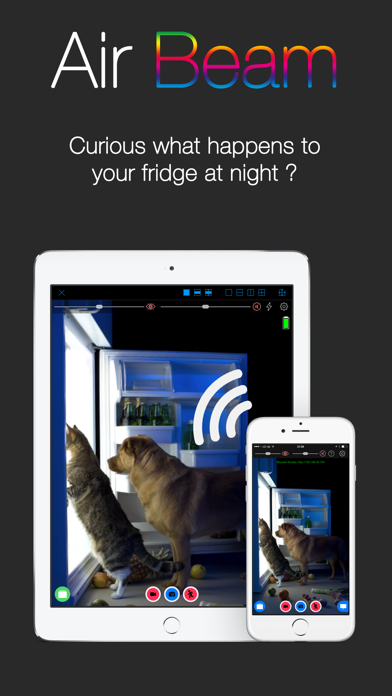
AirBeam turns your iDevices into a realtime audio and video surveillance system. AirBeam streams live video and audio from the cameras and microphones of iPhones, iPods, iPads. You can watch the stream on any other iDevice, Mac, Web browser or AppleTV - even on multiple screens simultaneously.
Use your iDevices as luxury babyphones, for serious surveillance, to keep an eye on your pets, a FPV cam in your remote controlled toys…there are hundreds of useful and not so useful things you can do with it. Even if you have just a single device AirBeam is an awesome tool for motion controlled video recording.
AirBeams features in detail:
* High Quality Realtime: Watch video and hear audio on your remote device in amazing quality with resolution up to Full-HD 1080p, 30 frames per second and CD quality audio. Watch and hear in realtime thanks to AirBeam's low latency encoding and transmission technology.
* Zero Configuration: No need to manually configure device addresses. AirBeam automatically discovers all AirBeam cams on your network and you can instantly watch them.
* Multi Camera, Multi Monitor: Launch as many camera devices as you want and monitor them simultaneously. Or follow a single camera on multiple screens at the same time. On an iPad you can watch up to four cameras at a time.
* Recording: Seeing or hearing something on AirBeam you want to remember? Just press the record button and the video and audio will be recorded. You can also capture still images.
* Motion and audio detection: Trigger alarms or recordings when something happens in front of the camera to create a single track of events that happened during a day.
* Dropbox integration (requires iOS>=9): Uploads recordings directly to your Dropbox account.
* Web interface: Use a browser to watch (no audio in a browser) the live video, download your recordings or adjust the camera settings.
* Two-way audio: Audio streaming works both ways so that you can also talk through the camera device.
* Full remote control: Adjust all camera settings and access to your photo and video library remotely from the monitor device.
* Virtual reality mode: Render the video stream in stereo for watching with a virtual reality headset such as the FreeFlyVR orCardboard.
* Motrr Galileo supported: Remotely pan and tilt your iPhone camera when mounted in a Galileo robotic motion platform.
* AND COMPLETELY FOR FREE: AirBeam viewer app for Mac and AppleTV available in the Mac and AppleTV AppStore.
Important notes
=============
* Best video quality is achieved when AirBeam is used within a local WiFi network. With port forwarding configured in your WiFi router it is also possible to monitor AirBeam cameras on your WiFi at home from anywhere in the Internet. Do do this you need to configure a port forwarding for port 8123 in your WiFi router - see the FAQ pages on our homepage for more details. And check your data plan, live video over cellular consumes quite some bandwidth...
* Please consider regulations for video surveillance in your country.
Use your iDevices as luxury babyphones, for serious surveillance, to keep an eye on your pets, a FPV cam in your remote controlled toys…there are hundreds of useful and not so useful things you can do with it. Even if you have just a single device AirBeam is an awesome tool for motion controlled video recording.
AirBeams features in detail:
* High Quality Realtime: Watch video and hear audio on your remote device in amazing quality with resolution up to Full-HD 1080p, 30 frames per second and CD quality audio. Watch and hear in realtime thanks to AirBeam's low latency encoding and transmission technology.
* Zero Configuration: No need to manually configure device addresses. AirBeam automatically discovers all AirBeam cams on your network and you can instantly watch them.
* Multi Camera, Multi Monitor: Launch as many camera devices as you want and monitor them simultaneously. Or follow a single camera on multiple screens at the same time. On an iPad you can watch up to four cameras at a time.
* Recording: Seeing or hearing something on AirBeam you want to remember? Just press the record button and the video and audio will be recorded. You can also capture still images.
* Motion and audio detection: Trigger alarms or recordings when something happens in front of the camera to create a single track of events that happened during a day.
* Dropbox integration (requires iOS>=9): Uploads recordings directly to your Dropbox account.
* Web interface: Use a browser to watch (no audio in a browser) the live video, download your recordings or adjust the camera settings.
* Two-way audio: Audio streaming works both ways so that you can also talk through the camera device.
* Full remote control: Adjust all camera settings and access to your photo and video library remotely from the monitor device.
* Virtual reality mode: Render the video stream in stereo for watching with a virtual reality headset such as the FreeFlyVR orCardboard.
* Motrr Galileo supported: Remotely pan and tilt your iPhone camera when mounted in a Galileo robotic motion platform.
* AND COMPLETELY FOR FREE: AirBeam viewer app for Mac and AppleTV available in the Mac and AppleTV AppStore.
Important notes
=============
* Best video quality is achieved when AirBeam is used within a local WiFi network. With port forwarding configured in your WiFi router it is also possible to monitor AirBeam cameras on your WiFi at home from anywhere in the Internet. Do do this you need to configure a port forwarding for port 8123 in your WiFi router - see the FAQ pages on our homepage for more details. And check your data plan, live video over cellular consumes quite some bandwidth...
* Please consider regulations for video surveillance in your country.
Photo & Video
21.06.2017 21:54
Velikost: 17 MB
Cena: US$ 0
Hodnoceni: 0
od 0 lidí
od 0 lidí
Appologics UG (haftungsbeschrankt)
AirBeam 2.3
AirBeam allows you to watch and hear on your Mac what the cameras of your iPhones, iPods or iPads see and hear. AirBeam receives high quality video and audio in realtime from the cameras and microphones of any number of iPhones, iPods or iPads on a WiFi network - even from multiple devices simultaneously.
AirBeam turns your Mac into a flexible remote surveillance system. Use it together with your iDevices as a babyphone, for serious surveillance, to keep an eye on your cat, a FPV cam in your remote control toys…there are hundreds of useful and not so useful things you can do with it.
AirBeams features in detail:
* High Quality Realtime: Watch video and hear audio in amazing quality. Watch and hear in realtime thanks to AirBeam's low latency encoding and transmission technology.
* Zero Configuration: No need to manually configure device addresses. AirBeam automatically discovers all AirBeam cams on your network and you can instantly watch them.
* Video Recording: Seeing or hearing something on AirBeam you want to remember? Just press the record button and it will be recorded.
* Motion and audio detection: Trigger recording based on detected motion or audio or get visual and acoustic alarms.
* Multi Camera: Watch as many camera devices as you want simultaneously.
* Fullscreen: View the cameras in fullscreen and flick through them with your touchpad.
Want to know more? Visit our website and watch the AirBeam demo video.
IMPORTANT NOTES
===========
* To use AirBeam you need to install and run AirBeam for iOS on your iDevices. AirBeam for iOS is available for USD 3.99 (or equivalent amount in other currency) in the App Store on your iPhone, iPod or iPad.
* If you also want to share your Mac's cameras and watch them on your iDevices, you need to use AirBeam Pro.
AirBeam turns your Mac into a flexible remote surveillance system. Use it together with your iDevices as a babyphone, for serious surveillance, to keep an eye on your cat, a FPV cam in your remote control toys…there are hundreds of useful and not so useful things you can do with it.
AirBeams features in detail:
* High Quality Realtime: Watch video and hear audio in amazing quality. Watch and hear in realtime thanks to AirBeam's low latency encoding and transmission technology.
* Zero Configuration: No need to manually configure device addresses. AirBeam automatically discovers all AirBeam cams on your network and you can instantly watch them.
* Video Recording: Seeing or hearing something on AirBeam you want to remember? Just press the record button and it will be recorded.
* Motion and audio detection: Trigger recording based on detected motion or audio or get visual and acoustic alarms.
* Multi Camera: Watch as many camera devices as you want simultaneously.
* Fullscreen: View the cameras in fullscreen and flick through them with your touchpad.
Want to know more? Visit our website and watch the AirBeam demo video.
IMPORTANT NOTES
===========
* To use AirBeam you need to install and run AirBeam for iOS on your iDevices. AirBeam for iOS is available for USD 3.99 (or equivalent amount in other currency) in the App Store on your iPhone, iPod or iPad.
* If you also want to share your Mac's cameras and watch them on your iDevices, you need to use AirBeam Pro.
iPod, iPhone and iPad Firmware Download
MacBook Pro13,Early 2011,OS X Yosemite
iPhone6+,64GB,iOS 9beta3
MacBook Pro13,Early 2011,OS X Yosemite
iPhone6+,64GB,iOS 9beta3
- Starý pes fóra :)

- Příspěvky: 2924
- Registrován:
ned pro 06, 2009 10:22 pm
pistak | úte lis 25, 2014 10:00 pm
Re: H: macbook kamera v iphone
Dakujem ale toto je asi len ze to premeni moj iphone na kameru. Ale ja chcem premenit na kameru moj macbook aby som na iphone aj mimo domu videl co sa deje doma. 
- iPhone guru
- Příspěvky: 1088
- Registrován:
pát pro 25, 2009 4:41 pm - Bydliště: Poprad - Bratislava
makatch | úte lis 25, 2014 10:05 pm
H: macbook kamera v iphone
Skús si poriadne prečítať popis aplikácie. Ten druhý odkaz je do MAC AppStore. Z macu mozes spraviť kameru a z iPhonu monitor a naopak. Len pre prístup z vonku musíš nastaviť na routri port forwarding.
iPod, iPhone and iPad Firmware Download
MacBook Pro13,Early 2011,OS X Yosemite
iPhone6+,64GB,iOS 9beta3
MacBook Pro13,Early 2011,OS X Yosemite
iPhone6+,64GB,iOS 9beta3
- Starý pes fóra :)
- Příspěvky: 2924
- Registrován:
ned pro 06, 2009 10:22 pm
 dawe73 | úte lis 25, 2014 10:09 pm
H: macbook kamera v iphone
A co přes např. Teamviewer vzdáleně zapnout na Macu Photobooth (nebo jak se to jmenuje)? Kdysi jsem tak sledoval, co dělá pes doma, když jsem v práci.. Je to sice nouzový řešení, ale na občasnou kontrolu bytu to stačilo..
- Pokročilý uživatel

- Příspěvky: 538
- Registrován:
pon pro 24, 2007 1:06 pm - Bydliště: Praha
Jan123 | čtv lis 27, 2014 10:44 am
Re: H: macbook kamera v iphone
Aku treba webkameru.Dakujem za odpoved.
- Host

- Příspěvky: 14
- Registrován:
pon led 13, 2014 12:31 pm
- Host
- Příspěvky: 115
- Registrován:
stř dub 08, 2009 4:38 pm -

Clon | pon pro 01, 2014 3:05 pm
Re: H: macbook kamera v iphone
Ja kdysi zkousel na notasu s widlema tohle https://itunes.apple.com/cz/app/splasht ... 11788?mt=8
EDIT: A dnes mě ještě napadlo https://itunes.apple.com/cz/app/baby-mo ... 77681?mt=8 - to je i pro MAC


VÍCE O APLIKACI
EDIT: A dnes mě ještě napadlo https://itunes.apple.com/cz/app/baby-mo ... 77681?mt=8 - to je i pro MAC
Lifestyle
15.09.2026 08:19
Velikost: 72 MB
Cena: US$ 7.99
Hodnoceni: 4.70451
od 2166 lidí
od 2166 lidí
TappyTaps s.r.o.
Baby Monitor 3G 6.0.3
No subscription. No monthly fees.
Buy Baby Monitor 3G once — use it whenever you need it.
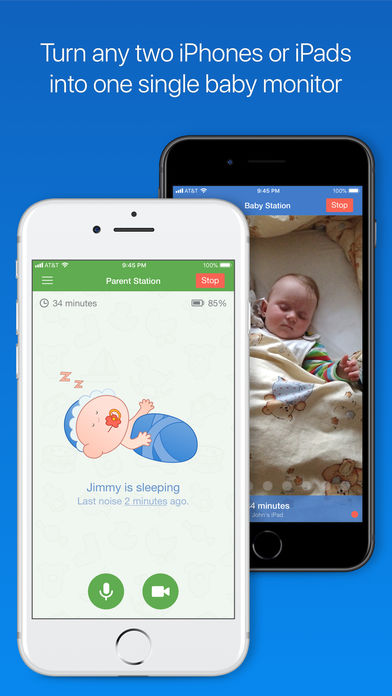
Turn two iPhones/iPads into a reliable video + audio baby monitor that works over Wi-Fi or cellular. Set it up in minutes and keep an eye (and ear) on your baby from anywhere.
Why parents choose Baby Monitor 3G
• Pay once, use forever – no recurring payments
• Works anywhere – Wi-Fi, 3G/LTE/5G cellular, unlimited range
• Private & secure – encrypted connection
• Quick setup – simple pairing and easy controls
• Reliable alerts – hear every sound, get notified when you need it
Perfect for real life
At home
Use an old iPhone/iPad as the Baby unit and keep your current phone as Parent.
On the go
Travel, visit family, or stay at a hotel — Baby Monitor 3G works over cellular when Wi-Fi is weak.
Peace of mind
Live video + audio, night mode, and smart notifications help you relax when your baby sleeps.
Key features
• Live HD video and clear audio
• Night mode and screen dimming
• Push notifications and vibration alerts
• Two-way talk (comfort your baby remotely)
• Background audio (keep listening while using other apps)
• Multiple Parent devices (share with a partner)
• Adjustable sensitivity and alert settings
Privacy & security
• Encrypted connection between your devices
• No public streaming
• No account required
Compatibility
Baby Monitor 3G works on iPhone and iPad.
Please note: the iOS and macOS versions are sold separately.
Buy Baby Monitor 3G once — use it whenever you need it.
Turn two iPhones/iPads into a reliable video + audio baby monitor that works over Wi-Fi or cellular. Set it up in minutes and keep an eye (and ear) on your baby from anywhere.
Why parents choose Baby Monitor 3G
• Pay once, use forever – no recurring payments
• Works anywhere – Wi-Fi, 3G/LTE/5G cellular, unlimited range
• Private & secure – encrypted connection
• Quick setup – simple pairing and easy controls
• Reliable alerts – hear every sound, get notified when you need it
Perfect for real life
At home
Use an old iPhone/iPad as the Baby unit and keep your current phone as Parent.
On the go
Travel, visit family, or stay at a hotel — Baby Monitor 3G works over cellular when Wi-Fi is weak.
Peace of mind
Live video + audio, night mode, and smart notifications help you relax when your baby sleeps.
Key features
• Live HD video and clear audio
• Night mode and screen dimming
• Push notifications and vibration alerts
• Two-way talk (comfort your baby remotely)
• Background audio (keep listening while using other apps)
• Multiple Parent devices (share with a partner)
• Adjustable sensitivity and alert settings
Privacy & security
• Encrypted connection between your devices
• No public streaming
• No account required
Compatibility
Baby Monitor 3G works on iPhone and iPad.
Please note: the iOS and macOS versions are sold separately.
iPhone X iOS 13.3, iPad Pro 11" iOS 13.3, ATV 4
(+ starsi kousky iPad 3 (NEW) 64 GB + cellular, iOS 7.1.1 + JB Pangu China, iPhone 5 64 GB, iOS 9.3.3 NO JB, iPad Air + Cellular 128 GB, iOS 9.3.3 NO JB)
(+ starsi kousky iPad 3 (NEW) 64 GB + cellular, iOS 7.1.1 + JB Pangu China, iPhone 5 64 GB, iOS 9.3.3 NO JB, iPad Air + Cellular 128 GB, iOS 9.3.3 NO JB)
- iPhonefil
- Příspěvky: 2670
- Registrován:
stř črc 11, 2012 4:29 pm -
Příspěvků: 8
• Stránka 1 z 1
Kdo je online
Uživatelé procházející toto fórum: Google [Bot]